Automating repetitive tasks with ease
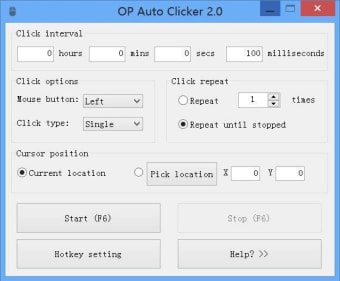
OP Auto Clicker, developed by Mouse Tool, is a free and lightweight utility designed to handle repetitive mouse clicking tasks efficiently. Ideal for gamers, testers, and data entry professionals, this tool automates clicks with precision. Users can configure intervals down to milliseconds and choose between single, double, and triple clicks. Its ad-free design and straightforward setup make it an accessible solution for anyone seeking reliable, no-frills click automation.
Top Recommended Alternative

Customization and control for every task
The intuitive interface of OP Auto Clicker allows users to set up clicking patterns in seconds. It supports two primary modes—fixed-position clicking and dynamic clicking that follows the cursor. Adjustable intervals and hotkey support make it convenient for multitasking or background operation. While it doesn’t include full macro recording, its focus on core automation ensures smooth performance without excessive CPU use, appealing to users who value simplicity and reliability.
Streamlined functionality for any user
OP Auto Clicker delivers consistent performance across devices, focusing on precision and ease of use rather than platform-specific limitations. Its lightweight structure ensures smooth operation even during continuous clicking tasks. Whether applied to gaming, testing, or workflow automation, the tool remains efficient and adaptable. Users benefit from customizable controls and responsive performance, making it a practical choice for repetitive tasks in diverse environments.
Final thoughts
OP Auto Clicker remains a dependable choice for straightforward click automation. It emphasizes speed, simplicity, and precision while maintaining a clean, distraction-free experience. Although its plain interface may lack visual flair, the focus on usability and consistent performance makes it one of the more practical automation tools available for routine tasks.